



 Zoom to fit the screen
Over speed by input
Submitted by rd on Fri, 12/02/2022 - 12:021. Purpose
- Allows users to check the specific time and location where the vehicle overspeeds.
2. Implementation conditions
- The user is granted permission for the Over speed by input function on the CRM system.
3. Implementation instructions
- Go to the Abnormal Report»Over speed by input

- The display function screen consists of 2 parts:
+ Fleet Queries section allows users to set up time parameters and vehicles to view the report;
+ Report details section displays the daily driving time of each driver
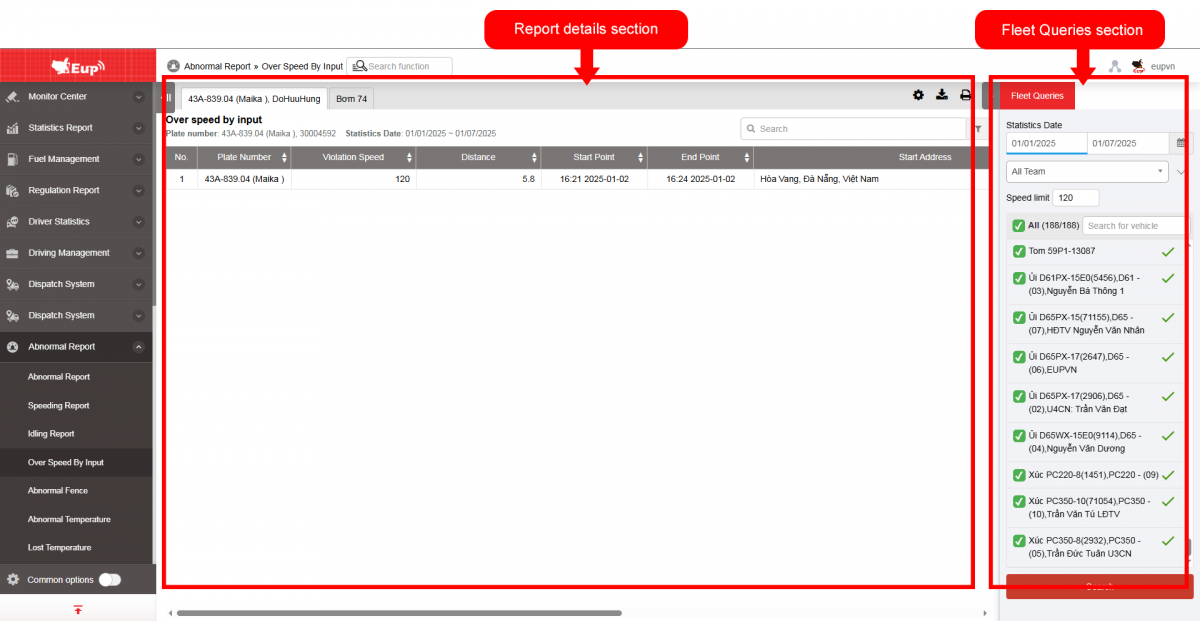
+ Fleet Queries section: the user selects the following information:
-
From: The user enters the first day to create the report;
-
To: The user selects the last day to create the report;
-
Select the icon
 to select the Team;
 -
In the vehicle list: Check the checkbox to select the vehicle to report;
-
Speed Limit (default 120): When the vehicle exceeds ... km/h, it will be displayed in the report.
-
Click Search button to display the report in the Report Details section.
+ Report details section: Display detailed report information.
-
Plate number
-
Violation Speed
-
Distance
-
Start point: The moment the vehicle begins exceeding the speed limit
-
End point: The moment the vehicle stops exceeding the speed limit
-
Start Address
-
Start coordinate
-
End Address
-
End coordinate
+ Select the icon  to print the report
+ Select the icon  to download the report as excel
+ Select the icon  to Custom Field, Plate number field settings, Print signature setting