



 Zoom to fit the screen
Record stop parking
Submitted by rd on Fri, 12/02/2022 - 14:441. Purpose
- Support users to create driver parking reports, thereby detecting unusual parking points that are not on the vehicle's route.
2. Implementation conditions
- Decentralized usersRecord stop parking
in the system's Authorization function.
3. Implementation instructions
- Go to the Statistic report/ Record stop parking function

- The function display screen consists of 2 parts:
+ The Fleet queries section allows users to set up time parameters and vehicles to view reports;
+ The Record stop parking section displays information about the vehicle's stops.
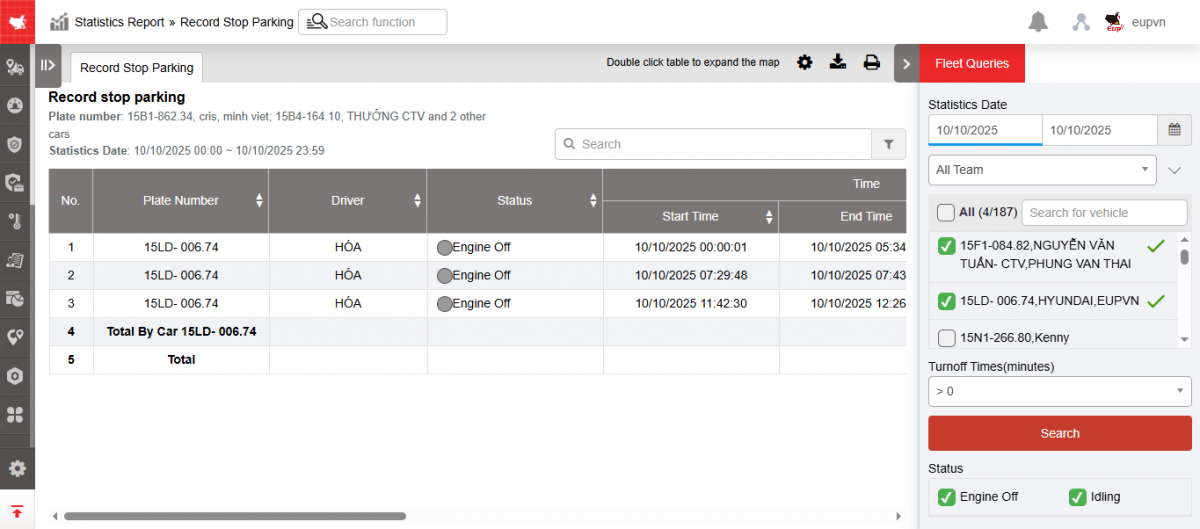
+ Fleet queries section : To view the report, users select the following information:
-
From: User enters the first date to create the report;
-
To: User selects the last date to create the report;
-
Select the icon
 to select a fleet;
 -
Vehicle: User ticks the checkbox to select the vehicle in the report;
-
Turnoff Times(minutes): Select parking time >...minutes
-
Click Search to display the report in the Record stop parking section
-
Status: Checkbox selected
-
Engine Off
-
Idling
-
+Record stop parking section : Allows users to view all detailed information about the vehicle's parking number, specifically:
-
Plate number;
-
Driver;
-
Status;
-
Time:
-
Start time: Start time of stopping;
-
End time: End time of parking;
-
Total time(Minute) : Total stopping time (in minutes);
-
-
Address: Location where the vehicle is parked;
-
Coordinates: Coordinates where the vehicle stops;
+ Select the icon  to print the report
+ Select the icon  to download the report in excel format
+ Select icons  to customize display columns, customize license plates on reports and set up printing signatures