



 Zoom to fit the screen
Working
Submitted by rd on Wed, 12/07/2022 - 09:311. Purpose
- Allows users to check the concrete pouring status of each vehicle or the entire fleet over time.
2. Implementation conditions
- Users are authorized to Worrking function on CRM system
3. Implementation instructions
- Go to menu Statistics report/Working

- The function display screen consists of 2 parts:
+ The Fleet Queries section allows users to search for information based on vehicle and time criteria;
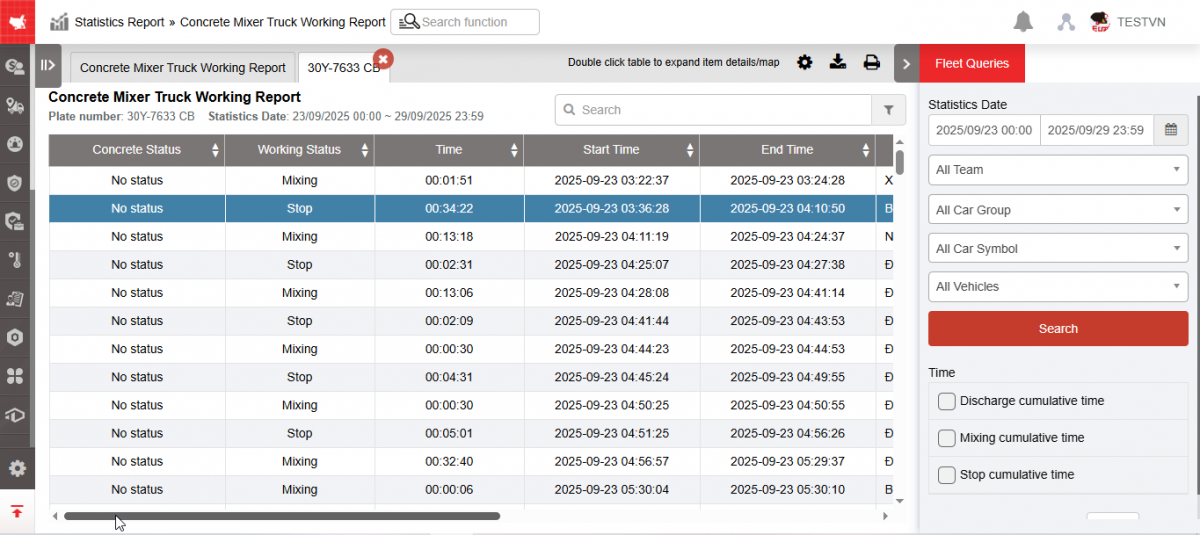
+ Working section displays detailed concrete discharge time of each vehicle

+ Fleet Queries section : User selects the following information
-
From : User enters the first date he wants to view the report
-
To : User enters the last date to view the report
-
Fleet : User selects icon
 to select fleet, default is Whole fleet
 -
Vehicle : User selects icon
to select specific vehicle, default is All vehicles -
Click Search to display the report information in the Concrete Discharge Query section
+ Working section : Allows displaying the following information:
-
Plate number
-
Driver: Driver's name
-
Discharge cuculative time : Is the time the vehicle takes to pour concrete
-
Click on the line you want to see details, the system displays the detailed screen:
-
Concrete status
-
Working status
-
Start time : Time the vehicle starts pouring concrete
-
End time: Time the vehicle stops pouring concrete
-
Time : Displays total concrete pouring time
-
Address: Location of vehicle pouring concrete
-
Milestone name : Milestone name for concrete pouring
-
+ Select the icon  to print the report
+ Select the icon  to download the report in excel format
+ Select the icon  to set the display or hide or change the sort order of the report columns