



 Zoom to fit the screen
Trailer Report
Submitted by rd on Fri, 12/02/2022 - 14:421. Purpose
- Allows users to check information about trailer connection and disassembly time, connection and disassembly locations, total time the tractor and trailer are assigned together as well as the number of kilometers traveled during the trailer assignment time.
2. Implementation conditions
- Users are authorized to Trailer report on the CRM system.
3. Operation
- Go to the Statistics Report/Trailer report function .
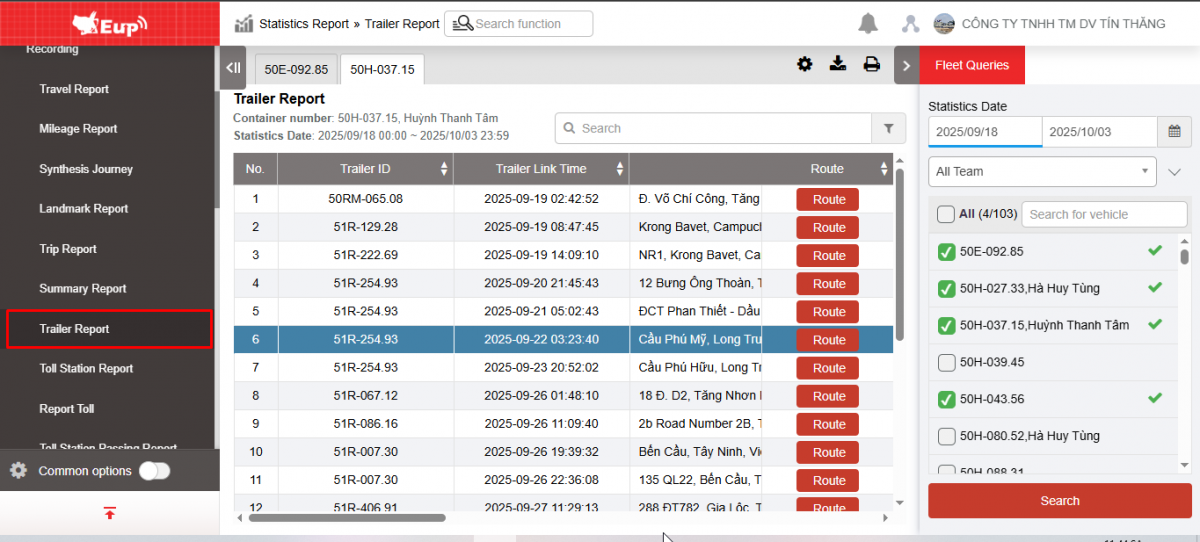
- The function display screen consists of 2 parts:
1. Fleet Queries section for users to select information about time and vehicle list,
2. Trailer Report section displays detailed information about trailer connection and disassembly time, connection and disassembly locations, total time the tractor and trailer are assigned together, as well as the number of kilometers traveled during the trailer assignment time.

+ Fleet Queries section : allows users to set up search information as follows:
-
From : Select the first date and time that the user wants to see
-
To : Select the last date and time that the user wants to see
-
Fleet: Default to the entire fleet and allows selecting other fleets in the system
-
Vehicles: Allows selection of one, multiple or all vehicles using checkbox
-
Click Search to display results
+ Report section : Includes indicators
-
Trailer ID: Trailer License Plate connected to vehicle
-
Trailer Link Time: Time the trailer starts to connect to the vehicle
-
Address: Address to perform Mooc connection
-
Trailer Unlink Time: Time the trailer is removed from the vehicle
-
Address: Address to perform the removal of the trailer
-
Mileage Number of Km the vehicle travels from the time the trailer is attached to the time the trailer is removed
-
Time accumulation
-
Driving time: Total driving time from trailer attachment to trailer disengagement
-
Route: Press the Route button , the system supports displaying the vehicle's travel history

+ Select the icon  to print the report
+ Select the icon  to download the report in excel format
+ Select icons  to customize display columns, customize license plates on reports and set up printing signatures
+ Trailer removal, disconnection, and trailer installation events:
-
If the Trailer signal is sent back for more than 15 minutes and the customer only uses the VN40 option and has not been paired with any previous trailer, the update is that the connection is lost.
-
The signal sent by the trailer is greater than 15 minutes and the customer only uses the VN40 option and was previously paired with the tractor, then the update is the event of removing the trailer.
-
In case the customer uses option VN40A and the tractor signal is sent back <=30 minutes. If the tractor loses signal and was previously attached to a trailer and the distance from the trailer to the tractor is >150m, the Trailer removal event will be updated. If the distance between the tractor and the trailer is <=150m, the tractor is still understood to be attached to the previous vehicle.
-
In case the customer uses VN40A and the tractor signal is sent back >30 minutes and before that the tractor has an event attached to a trailer, check the distance between the tractor and the trailer >150m then update the trailer removal event.
-
In case the tractor signal is sent back <30p and there is a signal, at the same time check the Trailer signal, if the Trailer has a signal, the distance between the tractor and the Trailer is <500m, the time difference between the signal sent between the tractor and the Trailer is <30p, the speed difference between the Trailer and the tractor is <20km/h then the tractor and the Trailer have the same pairing information, update the Trailer installation event. Or if there is no information in the pairing table, select the Trailer closest to the tractor to update the Trailer installation event.