Record Dispatch Car
1. Purpose
- Allows users to track vehicles that have been and have not been dispatched to deliver goods, thereby being able to arrange vehicle dispatch appropriately.
2. Implementation conditions
- The user has an account to access the journey monitoring system and is authorized to use the Vehicle Control Panel function.
3. Implementation instructions
- Go to menu Statistics report/Record Dispatch Car
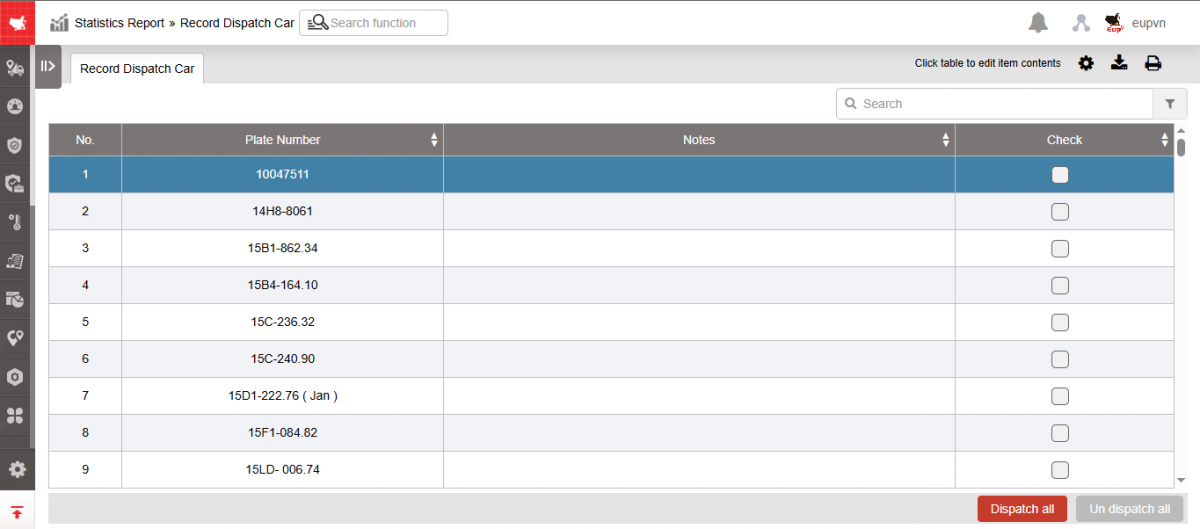
- Record Dispatch Car display function screen includes the following information:
-
STT
-
Plate number
-
Notes: Allow user to enter up to 250 characters
-
Check: Checkbox to Check/Uncheck the vehicle that has been controlled
-
Dispatch all: Select all vehicles
-
Un dispatch all: Uncheck all vehicles
* The order of arrangement when checking/unchecking is as follows:
-
When dispatching a vehicle: Select the license plate number and the vehicle will be arranged in order down to the end of the line.
-
When using the All Vehicles Control button, if some vehicles have been controlled, they will be pushed to the top in order and the uncontrolled vehicles will be pushed to the bottom in order.
-
When using the Cancel all vehicles button, the vehicle list will be rearranged in A - Z order.
- Select the icon  to print the report
- Select the icon  to download the report in excel format
- Select icons  to customize display columns, customize license plates on reports and set up printing signatures