Car Alert Setting
1. Purpose
- Allows users to enable/disable receiving warnings for each vehicle in the system
2. Implementation conditions
- Users are authorized to use option VN55; VN55A
3. Implementation instructions
- Go to the Journey Management/Car Alert Setting menu

- The function screen displays car nformation and the corresponding checkbox allows selection of Receive Car Alert

- To choose to receive warnings, the user selects the checkbox in the row corresponding to the vehicle and then clicks Save;
- When the vehicle is selected to receive warnings, it will comply with the following warning levels:
- Warning when stopping for more than the number of minutes at the function: Abnormal settings as shown below
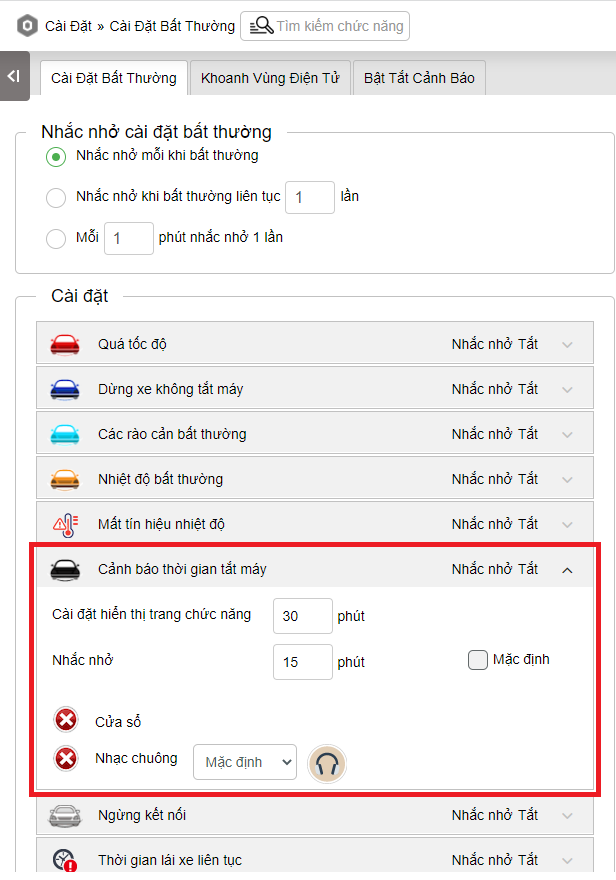
-
- Warning when the vehicle stops for more than the number of minutes set on the milestone as shown below. In case the stopping time is set to 0, when the vehicle stops at the milestone, there will be no warning

-
- Warning when the vehicle stops at points on the journey as shown below. If the stopping time is set to 0, there will be no warning when the vehicle stops at that point

-
- Warning priority: Prioritize warnings according to the configuration at the journey, then warnings at milestones and finally warnings according to the time set in the abnormal settings
- Log in to post comments
- Tiếng Việt
- 繁體中文
public cho khác hàng xem: