Maintenance history
1. Purpose
- Allows users to view detailed vehicle maintenance information according to each lookup period
2. Implementation conditions
- The user is authorized to use the Maintenance History function (VN73) and turn off the Settings/Warning Settings feature (VN27) on the authorization system.
3. Implementation instructions
- Go to menu Statistics report/Maintenance history

- The function display screen consists of 2 parts:
+ The Fleet Queries section allows users to set up information to display reports;
+ The Maintenance History section displays detailed maintenance-related information in report form.
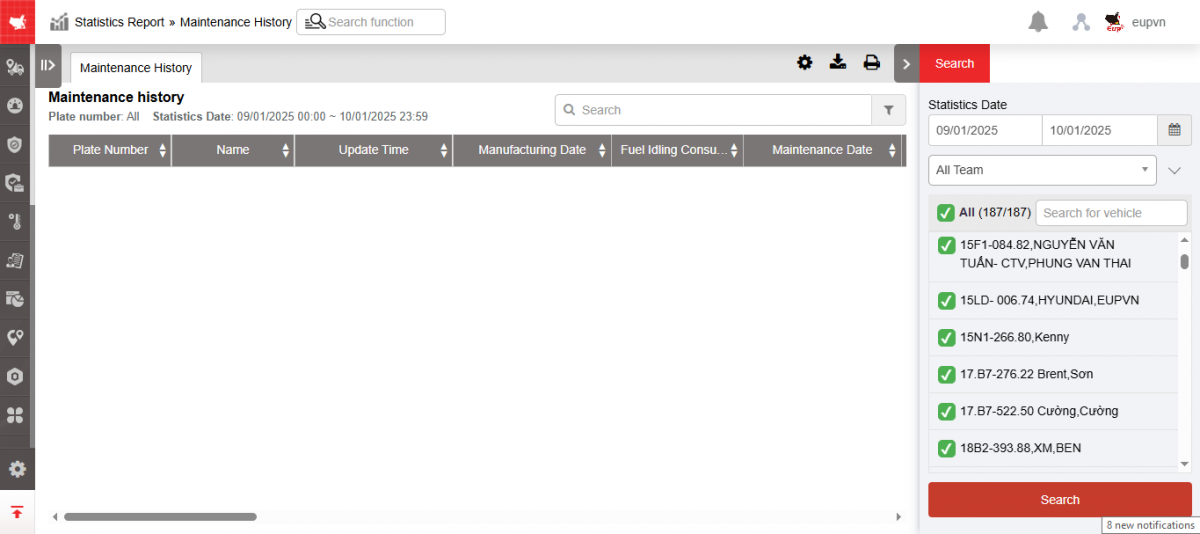
+ Fleet Queries section includes the following information:
-
From : Select the first date you want to look up the report
-
To : Select the last date you want to look up the report
-
Fleet: Default and allows selecting other fleets in the system
-
Vehicle : User can select 1 or more vehicles in the selected fleet by checking the checkbox.
-
Select Search to display results
+ The Maintenance History section displays detailed data according to the entered criteria in the Settings/Basic Information/Maintenance Check function.
-
Plate number
-
Name
-
Update time: The date the maintenance information change was made in the Settings/ Basic Information/ Maintenance Check function
-
Manufacturing Date
-
Fuel idling consumption(L/Hr): The maximum number of kilometers at which a vehicle must be maintained.
-
Maintenance Date: Date of most recent maintenance
-
Next Maintenance Date: Next scheduled maintenance date
-
Total Mileage: Total km traveled to date (accumulated km is calculated from the date of GPS device installation or from the most recent maintenance date to the present)
-
Remaining mileage = Standard km - Accumulated km
-
Mileage reminder: Set the remaining Km number that needs to be reminded. When the remaining KM number <= the remaining Km reminder number, a reminder will be given.
Example: Remaining Km = 50km (vehicle reaches the standard Km limit)
If the remaining reminder KM setting is 60 km or 50 km, a reminder notification will be displayed.
-
Last checkup date: Date of the most recent vehicle inspection
-
Next checkup date
-
Km on car
-
Insurance expiration
-
Registration Expiry Date
-
Badge Expiry Date
-
Maintenance Expiry Date 1
-
Maintenance Expiry Date 2
-
Tire Check Date
-
Accumulator Check Date
-
Oil check date
-
Clutch Check Date
-
Amaza Test Date
-
Recent service date
-
Next service date
+ Select the icon  to print the report
+ Select the icon  to download the report in excel format
+ Select icons  to customize display columns, customize license plates on reports and set up printing signatures
- Log in to post comments
- Tiếng Việt
- 繁體中文